|
12.04.2008
Updated 23.04.2008
Vyatta VC4 - Advanced VPN Site-to-Site Connections - Part 7 - Configure GRE/IPsec in Case of Scenario 1 Using IPsec ESP in Tunnel Mode and as GRE Tunnel Endpoints Private IP Addresses from the Loopback Interfaces
- 1.Vyatta HQ GRE/IPsec Config
- 2. Vyatta Branch1 GRE/IPsec Config
- 3. Vyatta Branch2 GRE/IPsec Config
- 4. Make The hub-and-spoke Topology a Mesh One
Since we tested the GRE and IPIP tunnels in case of Scenario 1, we can proceed and protect these tunnels with IPsec. If you do not recall what was Scenario 1 take a look here.
First let's configure GRE/IPsec.
There are a couple of ways in which we can configure GRE/IPsec.
Currently, as writing this, there is one way that it's working out-of-the-box, with the configuration lines entered directly from the CLI. We will use for the GRE tunnel endpoints private IP addresses from the loopback interfaces and IPsec ESP in tunnel mode.
The working configuration was suggested by Stig on vyatta.org/forum. You may like to read the entire thread.
IPsec ESP in transport mode is working from the CLI and we can use for the GRE tunnel endpoints the IP addresses from the physical interfaces, but when we will configure IPsec to protect these tunnels, Openswan will add some kernel routes which must be manually deleted. I suppose that if you are familiar with configuring GRE/IPsec with Cisco routers, you will tend to follow the same logic with Vyatta(I did so). There is nothing wrong in doing this, and Vyatta OFR can be configured like so, but currently as writing this, it's not working straigth from the CLI. As soon as all these will change, I will post the respective configurations(which should be simpler, no private IP addresses for the GRE tunnel endpoints from the loopback interfaces).
As before I will enable VMware Network AdapterVMnet5, see Figure95.
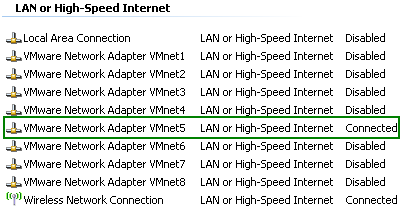
Figure95: VMware Network Adapter VMnet5 Enabled
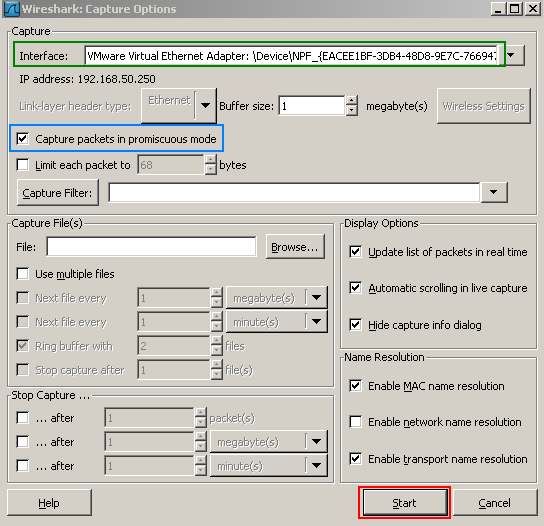
And I will start a Wireshark capture on the VMnet5 interface on the host machine(see Figure96, make sure "Capture packets in promiscous mode " is selected) . Doing so, I will have central point of view over the traffic sent between Vyatta VC4 machines, I will see the IKE negotiations, the IPsec traffic and so on. This is very useful for troubleshooting and we can actually see how things work.
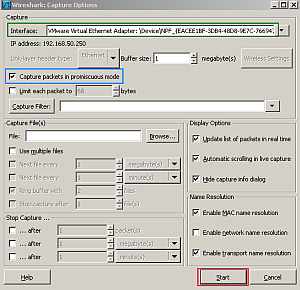
Figure96: Start a Wireshark capture on the VMnet5 interface on the host machine
1. Vyatta HQ GRE/IPsec Config
On the Vyatta HQ machine, since we are using a hub-and-spoke topology and Vyatta HQ is the hub, we will create two GRE point-to-point tunnels, one to Branch1 and the other to Branch2. Also we will create two IPsec VPN site-to-site connections, one to Branch1(to protect the GRE tunnel between HQ and Branch1), and the other to Branch2(to protect the GRE tunnel between HQ and Branch2).
Configure the loopback interface with two IP addresses which will serve as local GRE tunnel endpoints(one for the GRE tunnel between HQ and Branch1 and the other for the GRE tunnel between HQ and Branch2). And commit your settings.
set interfaces loopback lo address 192.168.200.1/24
set interfaces loopback lo address 192.168.210.1/24
commit
Configure two GRE tunnels. The remote-ip (remote tunnel endpoint) will be the IP address configured on the loopback interface of Vyatta Branch1 for the GRE tunnel between HQ and Branch1, and respectively the IP address configured on the loopback interface of Vyatta Branch2 for the GRE tunnel between HQ and Branch2. In practice you may shrink the IP address ranges from the tunnel interfaces from /24 to /30(since these are point-to-point tunnels).
I will not commit my settings yet, because I want to protect the tunnels first, so that no packet can travel in clear.
set interfaces tunnel tun1
set interfaces tunnel tun1 address 192.168.111.1/24
set interfaces tunnel tun1 description "Gre Tunnel to Branch1"
set interfaces tunnel tun1 encapsulation gre
set interfaces tunnel tun1 local-ip 192.168.200.1
set interfaces tunnel tun1 remote-ip 192.168.220.1
set interfaces tunnel tun2
set interfaces tunnel tun2 address 192.168.121.1/24
set interfaces tunnel tun2 description "Gre Tunnel to Branch2"
set interfaces tunnel tun2 encapsulation gre
set interfaces tunnel tun2 local-ip 192.168.210.1
set interfaces tunnel tun2 remote-ip 192.168.230.1
And the VPN configuration. I've configured an ike-group and an esp-group (by default IPsec ESP in tunnel mode is used).
And two IPsec VPN site-to-site connections, one to Branch1(to protect the GRE tunnel between HQ and Branch1), and the other to Branch2(to protect the GRE tunnel between HQ and Branch2). Note the local and remote subnets in both cases (actually we do not need to specify the entire /24 ranges, only communications from 192.168.200.1 to 192.168.220.1 need to be protected and from 192.168.210.1 to 192.168.230.1 respectively).
Since this is a simple test, I will use pre-shared keys for authentication.
I will commit my configuration.
set vpn ipsec ipsec-interfaces interface eth0
set vpn ipsec ike-group IKE-GRE proposal 1
set vpn ipsec ike-group IKE-GRE proposal 1 encryption aes128
set vpn ipsec ike-group IKE-GRE proposal 1 hash sha1
set vpn ipsec ike-group IKE-GRE proposal 1 dh-group 5
set vpn ipsec ike-group IKE-GRE lifetime 28800
set vpn ipsec esp-group ESP-GRE proposal 1
set vpn ipsec esp-group ESP-GRE proposal 1 encryption aes128
set vpn ipsec esp-group ESP-GRE proposal 1 hash sha1
set vpn ipsec esp-group ESP-GRE pfs
set vpn ipsec esp-group ESP-GRE lifetime 3600
set vpn ipsec site-to-site peer 192.168.50.3 authentication mode pre-shared-secret
edit vpn ipsec site-to-site peer 192.168.50.3
set authentication pre-shared-secret 12345
set ike-group IKE-GRE
set local-ip 192.168.50.2
set tunnel 1 local-subnet 192.168.200.0/24
set tunnel 1 remote-subnet 192.168.220.0/24
set tunnel 1 esp-group ESP-GRE
top
set vpn ipsec site-to-site peer 192.168.50.4 authentication mode pre-shared-secret
edit vpn ipsec site-to-site peer 192.168.50.4
set authentication pre-shared-secret 67890
set ike-group IKE-GRE
set local-ip 192.168.50.2
set tunnel 1 local-subnet 192.168.210.0/24
set tunnel 1 remote-subnet 192.168.230.0/24
set tunnel 1 esp-group ESP-GRE
top
commit
And we will run OSPF through these tunnels to discover the networks behind the other Vyatta VC4 machines.
set protocols ospf area 100
set protocols ospf area 100 network 192.168.10.0/24
set protocols ospf area 100 network 192.168.111.0/24
set protocols ospf area 100 network 192.168.121.0/24
set protocols ospf log-adjacency-changes
commit
2. Vyatta Branch1 GRE/IPsec Config
On the Vyatta Branch1 machine, which will be a spoke, we will create one GRE point-to-point tunnel, to Vyatta HQ. And one IPsec VPN site-to-site connection, to Vyatta HQ(to protect the GRE tunnel between Branch1 and HQ).
Configure the loopback interface with one IP address which will serve as the local GRE tunnel endpoint(for the GRE tunnel between Vyatta Branch1 and Vyatta HQ). And commit your settings.
set interfaces loopback lo address 192.168.220.1/24
commit
Configure the GRE tunnel. The remote-ip (remote tunnel endpoint) will be the first IP address configured on the loopback interface of Vyatta HQ.
As before, I will not commit my settings yet, because I want to protect the tunnel first, so that no packet can travel in clear.
set interfaces tunnel tun1
set interfaces tunnel tun1 address 192.168.111.2/24
set interfaces tunnel tun1 description "Gre Tunnel to HQ"
set interfaces tunnel tun1 encapsulation gre
set interfaces tunnel tun1 local-ip 192.168.220.1
set interfaces tunnel tun1 remote-ip 192.168.200.1
And the VPN configuration. I've configured an ike-group and an esp-group.
And one IPsec VPN site-to-site connection, to HQ(to protect the GRE tunnel between HQ and Branch1). Note the local and remote subnets (actually we do not need to specify the entire /24 ranges, only communications from 192.168.220.1 to 192.168.200.1 need to be protected).
I will commit my configuration.
set vpn ipsec ipsec-interfaces interface eth0
set vpn ipsec ike-group IKE-GRE proposal 1
set vpn ipsec ike-group IKE-GRE proposal 1 encryption aes128
set vpn ipsec ike-group IKE-GRE proposal 1 hash sha1
set vpn ipsec ike-group IKE-GRE proposal 1 dh-group 5
set vpn ipsec ike-group IKE-GRE lifetime 28800
set vpn ipsec esp-group ESP-GRE proposal 1
set vpn ipsec esp-group ESP-GRE proposal 1 encryption aes128
set vpn ipsec esp-group ESP-GRE proposal 1 hash sha1
set vpn ipsec esp-group ESP-GRE pfs
set vpn ipsec esp-group ESP-GRE lifetime 3600
set vpn ipsec site-to-site peer 192.168.50.2 authentication mode pre-shared-secret
edit vpn ipsec site-to-site peer 192.168.50.2
set authentication pre-shared-secret 12345
set ike-group IKE-GRE
set local-ip 192.168.50.3
set tunnel 1 local-subnet 192.168.220.0/24
set tunnel 1 remote-subnet 192.168.200.0/24
set tunnel 1 esp-group ESP-GRE
top
commit
And we will run OSPF through this tunnel to discover the networks behind the other Vyatta VC4 machines.
set protocols ospf area 100
set protocols ospf area 100 network 192.168.30.0/24
set protocols ospf area 100 network 192.168.111.0/24
set protocols ospf log-adjacency-changes
commit
3. Vyatta Branch2 GRE/IPsec Config
On the Vyatta Branch2 machine, which will be a spoke, we will create one GRE point-to-point tunnel, to Vyatta HQ. And one IPsec VPN site-to-site connection, to Vyatta HQ(to protect the GRE tunnel between Branch2 and HQ).
Configure the loopback interface with one IP address which will serve as the local GRE tunnel endpoint(for the GRE tunnel between Vyatta Branch2 and Vyatta HQ). And commit your settings.
set interfaces loopback lo address 192.168.230.1/24
commit
Configure the GRE tunnel. The remote-ip (remote tunnel endpoint) will be the second IP address configured on the loopback interface of Vyatta HQ.
As before, I will not commit my settings yet, because I want to protect the tunnel first, so that no packet can travel in clear.
set interfaces tunnel tun1
set interfaces tunnel tun1 address 192.168.121.2/24
set interfaces tunnel tun1 description "Gre Tunnel to HQ"
set interfaces tunnel tun1 encapsulation gre
set interfaces tunnel tun1 local-ip 192.168.230.1
set interfaces tunnel tun1 remote-ip 192.168.210.1
And the VPN configuration. I've configured an ike-group and an esp-group.
And one IPsec VPN site-to-site connection, to HQ(to protect the GRE tunnel between HQ and Branch2). Note the local and remote subnets(actually we do not need to specify the entire /24 ranges, only communications from 192.168.230.1 to 192.168.210.1 need to be protected).
I will commit my configuration.
set vpn ipsec ipsec-interfaces interface eth0
set vpn ipsec ike-group IKE-GRE proposal 1
set vpn ipsec ike-group IKE-GRE proposal 1 encryption aes128
set vpn ipsec ike-group IKE-GRE proposal 1 hash sha1
set vpn ipsec ike-group IKE-GRE proposal 1 dh-group 5
set vpn ipsec ike-group IKE-GRE lifetime 28800
set vpn ipsec esp-group ESP-GRE proposal 1
set vpn ipsec esp-group ESP-GRE proposal 1 encryption aes128
set vpn ipsec esp-group ESP-GRE proposal 1 hash sha1
set vpn ipsec esp-group ESP-GRE pfs
set vpn ipsec esp-group ESP-GRE lifetime 3600
set vpn ipsec site-to-site peer 192.168.50.2 authentication mode pre-shared-secret
edit vpn ipsec site-to-site peer 192.168.50.2
set authentication pre-shared-secret 67890
set ike-group IKE-GRE
set local-ip 192.168.50.4
set tunnel 1 local-subnet 192.168.230.0/24
set tunnel 1 remote-subnet 192.168.210.0/24
set tunnel 1 esp-group ESP-GRE
top
commit
And we will run OSPF through this tunnel to discover the networks behind the other Vyatta VC4 machines.
set protocols ospf area 100
set protocols ospf area 100 network 192.168.40.0/24
set protocols ospf area 100 network 192.168.121.0/24
set protocols ospf log-adjacency-changes
commit
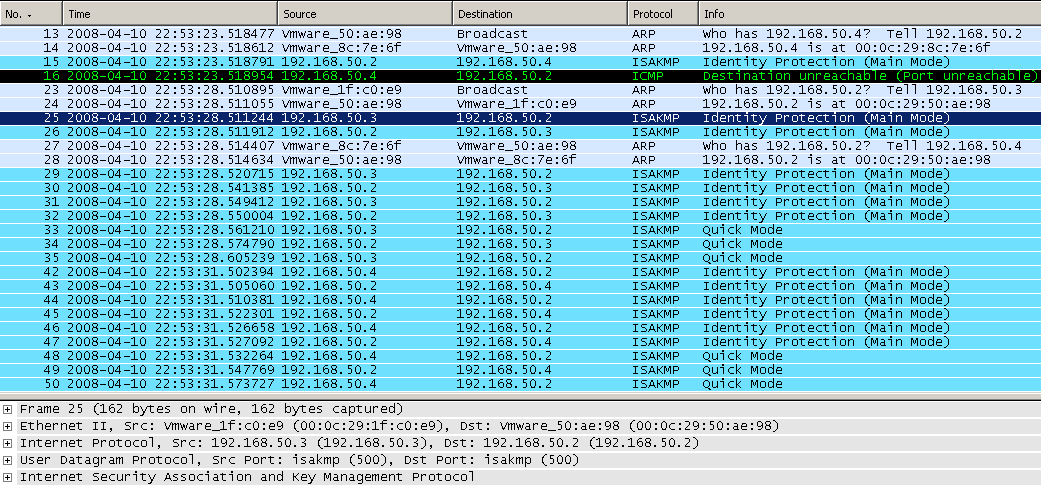
If we take a look at the Wireshark capture, we will notice that it recorded some activity, a sign that our "tunnels" are working. In Figure97 we can spot the IKE Phase II and II negotiations between HQ and Branch1, and between HQ and Branch2.
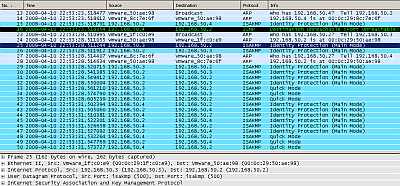
Figure97: Wireshark Capture GRE/IPsec
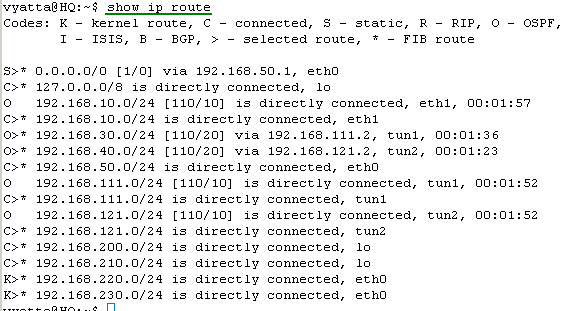
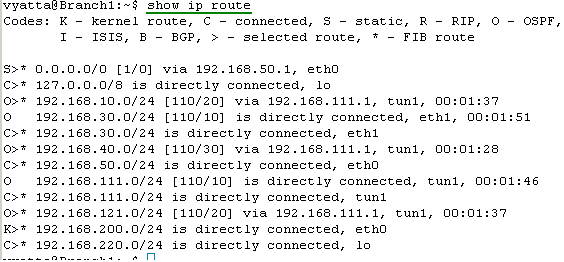
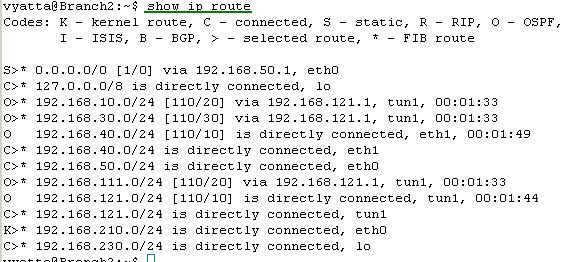
Let's check the routing table on the Vyatta HQ, Vyatta Branch1 and Vyatta Branch2, see Figure98, Figure99 and Figure100 . We can notice that every Vyatta VC4 machine is now aware of the networks behind the other Vyatta VC4 machines.
And spot the kernel routes we were talking about at the beginning at this part. If we were using IPsec ESP in transport mode with Vyatta VC4, we would not specify the "remote-subnet " and the "local-subnet". However, for example on Vyatta HQ, for the site-to-site VPN connection between Vyatta HQ and Vyatta Branch1, Openswan will add a kernel route that would say that 192.168.50.3/32 is directly connected, eth0. Yes, that's true in case of Scenario 1, but Scenario 1 is not very realistic. In practice this would be wrong, and testing Scenario 2(where the GRE tunnel endpoint is really a remote IP address), we would notice that the VPN tunnel is not working. To make it work we would need to manually delete the kernel routes. This would be also true for IPsec ESP in tunnel mode if for example on Vyatta HQ we would enter in the VPN configuration as "remote-subnet" 192.168.50.3/32 (the remote GRE tunnel endpoint as in Part 6) instead of 192.168.220.0/24, and as "local-subnet" 192.168.50.2/32 (the local GRE tunnel endpoint as in Part 6) instead of 192.168.200.0/24. Again the kernel route would say that 192.168.50.3/32 is directly connected, eth0. So to make the VPN tunnel work we would need to manually delete the kernel route.
With the GRE tunnel endpoints private IP addresses from loopback interfaces, we are not particularly concerned about the kernel routes.
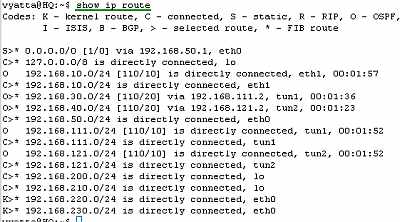
Figure98: Vyatta HQ GRE/IPsec: Routing Table
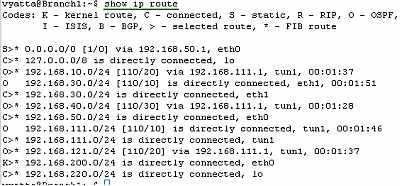
Figure99: Vyatta Branch1 GRE/IPsec: Routing Table
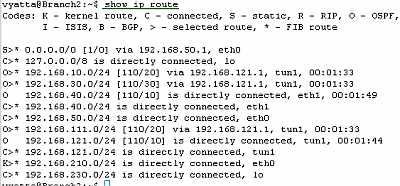
Figure100: Vyatta Branch2 GRE/IPsec: Routing Table
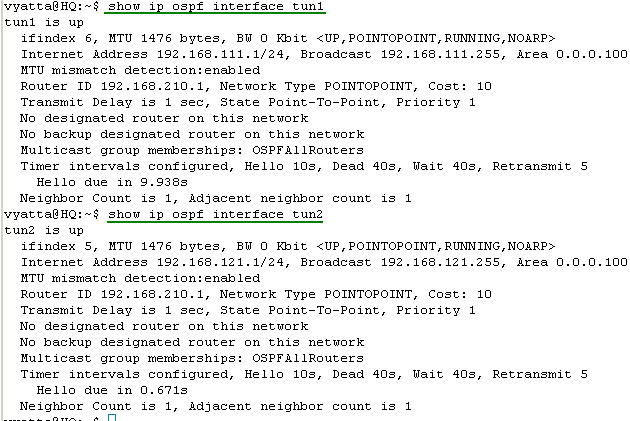
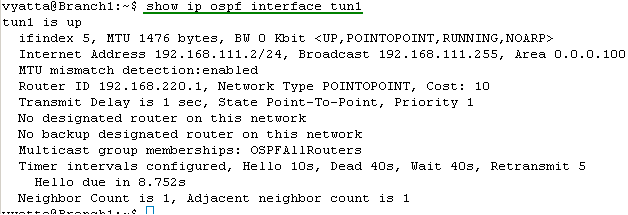
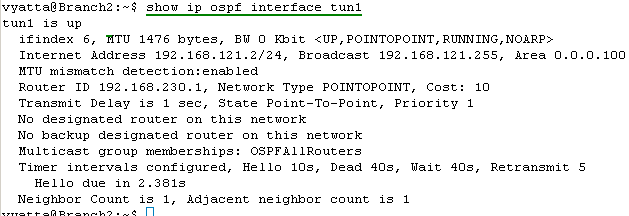
Let's look at the OSPF information about the tunnel interfaces on the Vyatta HQ, Vyatta Branch1 and Vyatta Branch2 (note the MTU too, the default one, you can modify it if necessary), see Figure101, Figure102 and Figure103.

Figure101: Vyatta HQ GRE/IPsec: show ip ospf interface tun1 and tun2
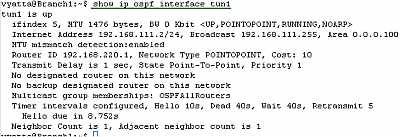
Figure102: Vyatta Branch1 GRE/IPsec: show ip ospf interface tun1
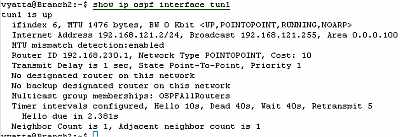
Figure103: Vyatta Branch2 GRE/IPsec: show ip ospf interface tun1
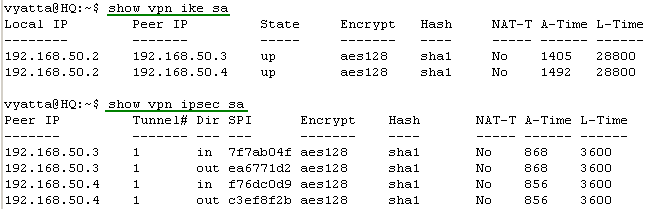
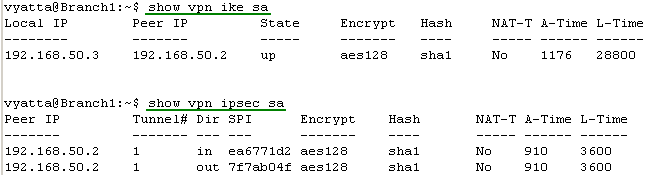
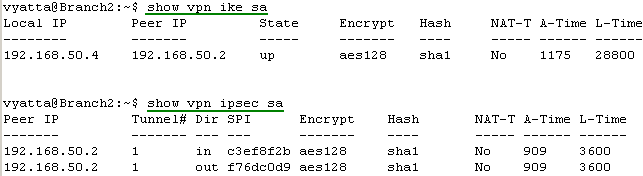
Let's look at some VPN information (IKE and IPsec SAs) on the Vyatta HQ, Vyatta Branch1 and Vyatta Branch2, see Figure104, Figure105 and Figure106.
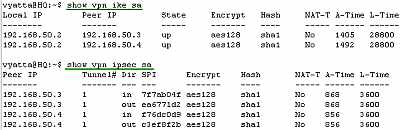
Figure104: Vyatta HQ GRE/IPsec: VPN Info
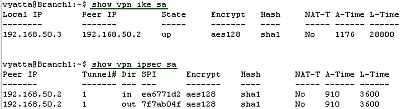
Figure105: Vyatta Branch1 GRE/IPsec: VPN Info
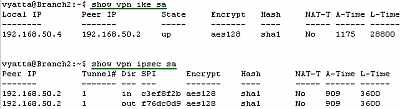
Figure106: Vyatta Branch2 GRE/IPsec: VPN Info
Let's see if we have connectivity between hosts located behind Vyatta VC4 machines, see Figure107, Figure108 and Figure109.
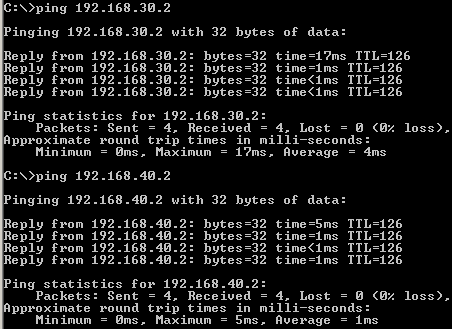
Figure107: GRE/IPsec: Ping from a Host Behind Vyatta HQ to Hosts Behind Vyatta Branch1 and Vyatta Branch2
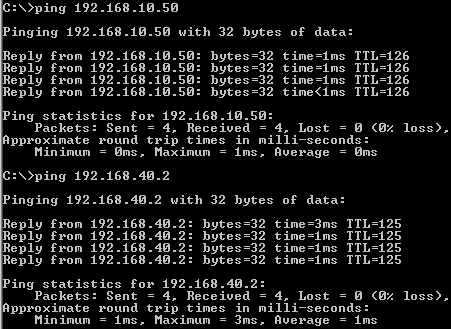
Figure108: GRE/IPsec: Ping from a Host Behind Vyatta Branch1 to Hosts Behind Vyatta HQ and Vyatta Branch2
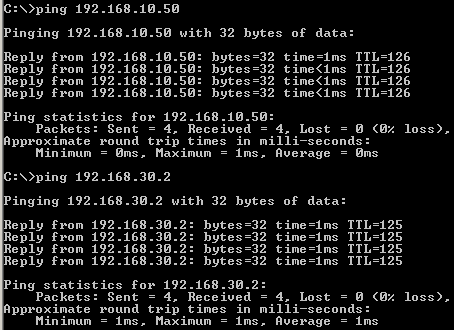
Figure109: GRE/IPsec: Ping from a Host Behind Vyatta Branch2 to Hosts Behind Vyatta HQ and Vyatta Branch1
Things look good.
All the configuration lines entered on Vyatta HQ, Vyatta Branch1 and Vyatta Branch2 can be found here:
- Vyatta HQ
- Vyatta Branch1
- Vyatta Branch2
4. Make The hub-and-spoke Topology a Mesh One
If you want, you can make the hub-and-spoke topology a mesh one, by configuring a point-to-point GRE tunnel between Branch1 and Branch2, and an IPsec VPN site-to-site connection between them to protect this GRE tunnel.
On Branch1 add:
set interfaces loopback lo address 192.168.240.1/24
commit
set interfaces tunnel tun2
set interfaces tunnel tun2 address 192.168.131.1/24
set interfaces tunnel tun2 description "Gre Tunnel to Branch2"
set interfaces tunnel tun2 encapsulation gre
set interfaces tunnel tun2 local-ip 192.168.240.1
set interfaces tunnel tun2 remote-ip 192.168.250.1
set vpn ipsec site-to-site peer 192.168.50.4 authentication mode pre-shared-secret
edit vpn ipsec site-to-site peer 192.168.50.4
set authentication pre-shared-secret abcde
set ike-group IKE-GRE
set local-ip 192.168.50.3
set tunnel 1 local-subnet 192.168.240.0/24
set tunnel 1 remote-subnet 192.168.250.0/24
set tunnel 1 esp-group ESP-GRE
top
commit
set protocols ospf area 100 network 192.168.131.0/24
commit
On Branch2 add:
set interfaces loopback lo address 192.168.250.1/24
commit
set interfaces tunnel tun2
set interfaces tunnel tun2 address 192.168.131.2/24
set interfaces tunnel tun2 description "Gre Tunnel to Branch1"
set interfaces tunnel tun2 encapsulation gre
set interfaces tunnel tun2 local-ip 192.168.250.1
set interfaces tunnel tun2 remote-ip 192.168.240.1
set vpn ipsec site-to-site peer 192.168.50.3 authentication mode pre-shared-secret
edit vpn ipsec site-to-site peer 192.168.50.3
set authentication pre-shared-secret abcde
set ike-group IKE-GRE
set local-ip 192.168.50.4
set tunnel 1 local-subnet 192.168.250.0/24
set tunnel 1 remote-subnet 192.168.240.0/24
set tunnel 1 esp-group ESP-GRE
top
commit
set protocols ospf area 100 network 192.168.131.0/24
commit
In Part 8 we will use IPsec to protect the IPIP tunnels on the Vyatta VC4 VMs for Scenario 1.
|