|
21.12.2007
Vyatta OFR supports multiple VPN Clients(either L2TP/IPsec and/or PPTP) located behind it(when NAT-ing)
Many people ask: "Does ISA 2006 support multiple VPN clients located behind the same NAT device at a time?", "If not, do you know a good VPN server that support this feature?"
The answer is: "Yes, ISA 2006, installed on Windows 2003 R2 SP2, supports multiple VPN clients located behind the same NAT device, L2TP/IPsec VPN Clients or/and PPTP VPN Clients."
However, the NAT device must also "support" these clients. Some NAT devices interfere and only one VPN client can successfully connect to ISA 2006 VPN server at a time, in both cases, PPTP or L2TP/IPsec connections.
Without entering in technical details we can quickly summarize the problems that might appear when multiple L2TP/IPsec or PPTP clients behind a NAT device attempt to connect to ISA 2006 behind the same NAT device at a time.
In case of L2TP/IPsec, the NAT device must resume to the simple job of NAT-ing and forwarding packets. ISA 2006 and Microsoft VPN clients in Windows XP or Windows Vista are NAT-T aware.
RFC3715, which "does not specify an Internet standard of any kind", describes known incompatibilities between NetworkAddress Translation (NAT) and IPsec, and describes the requirements for addressing them.
NAT-T modifies existing protocols instead of adjusting NAT devices.
RFC3947, Negotiation of NAT-Traversal in the IKE, an "Internet Official Protocol Standards ", describes how two peers can discover the presence of a NAT device between them and how to negotiate the use of UDP encapsulated IPsec packets in IKE's Quick Mode.
RFC3948, UDP Encapsulation of IPsec ESP Packets, an "Internet Official Protocol Standards ", defines methods to encapsulate and decapsulate IP Encapsulating Security Payload (ESP) packets inside UDP packets for traversing Network Address Translators.
The NAT-T implementation on ISA 2006 is based on the draft-ietf-ipsec-nat-t-ike-02. Same thing can be said about Windows XP SP2 and Windows 2003 VPN clients. Only the VPN client from Vista is using the RFC3947 NAT-T implementation along with the draft implementation.
UDP encapsulation is required to fix the inability to handle IPsec ESP traffic by NATs(Network Address Translations).
Doing so the NAT device will never see any IPsec ESP packets because these packets are encapsulated inside UDP packets.
However, some NAT devices, especially cheap ones, home devices, recongnize IPsec traffic even when both peers are NAT-T aware. They implement an IPsec pass-through feature that is IPsec aware. In theory this non-RFC feature should not disturb the NAT-T process since IPsec ESP packets will never be seen by the NAT device, being encapsulated inside UDP packets. In reality things might be different though.
Also, some NAT devices monitor UDP ports like 500, IKE UDP port. They actually require the IPsec pass-through feature to be enabled in order to be able to connect to the VPN server.
In case of PPTP VPN clients, NAT devices have problems tracking the GRE connection and the Call ID for PPTP. Vyatta had an issue with the scenario from this lab, issue which was fixed:
https://bugzilla.vyatta.com/show_bug.cgi?id=1944
So many people simply ask: "Do you know a good router/firewall which supports multiple VPN clients behind it when doing NAT ?"
The answer is "Yes, I do".
The inability to just prove these points(ISA 2006 case and NAT device case) without requiring the already cautious customer to pay some extra money in order to find out if it's so, can lead to frustration.
Luckily a straight answer can be given: Vyatta is such a router that supports multiple VPN clients behind it when doing NAT, either L2TP/IPsec or/and PPTP VPN clients and this can be proven in a second using VMware Server for example.
Both ISA 2006 and Vyatta can be installed as VMs in VMware Server so you can test their features and even more important if they actually do what you want them to do. For example, ISA 2006 is offered as a trial on Microsoft's site and Vyatta can be downloaded as a VMware appliance from Vyatta's site.
Figure1 describes the Network Diagram for this lab test:
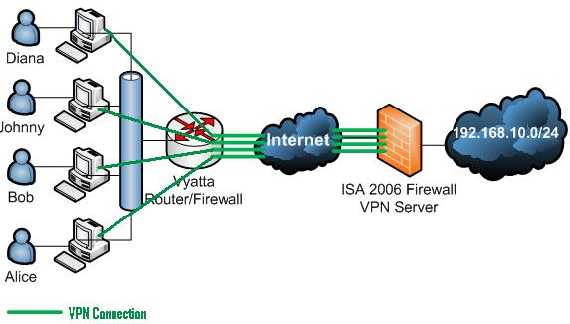
Figure1: The Network Diagram
Vyatta OFR VC3.0 and ISA 2006 Std installed on Windows 2003 R2 SP2 are used within this lab.
The network behind Vyatta is 192.168.40.0/24(private IP addresses), thus Vyatta is configured with a NAT rule type Masquerade(see Figure2). The outside-address is 192.168.22.79.
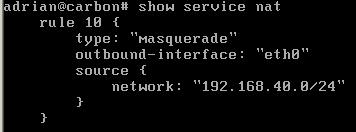
Figure2: Vyatta NAT Rule
The VPN Clients used within this lab are Windows XP SP2, Windows 2003 R2 and Windows Vista Business.
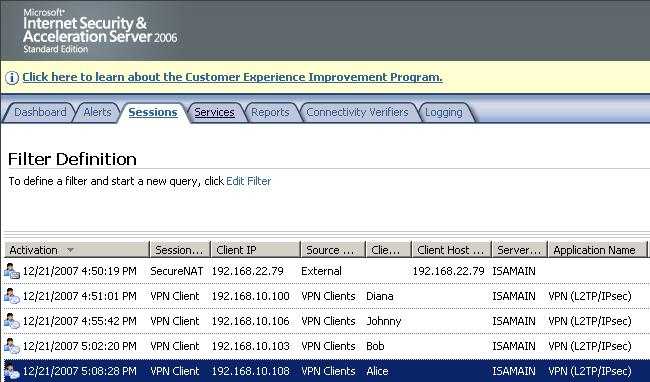
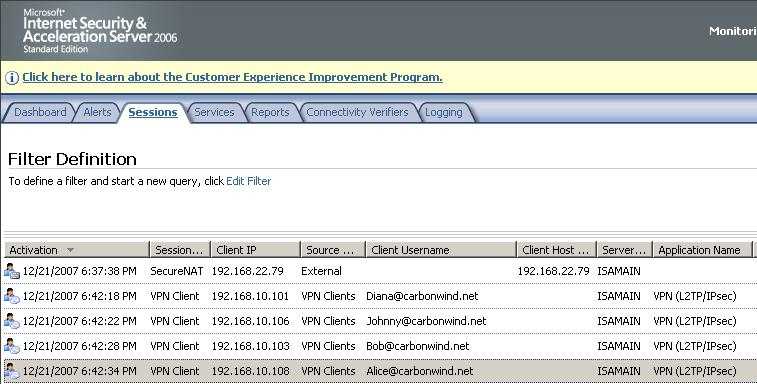
First test is with four L2TP/IPsec VPN clients behind Vyatta. Figure3 shows the four VPN clients connected to ISA.
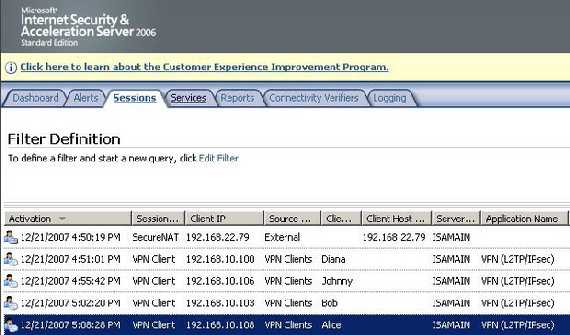
Figure3: ISA Monitoring Sessions L2TP/IPsec
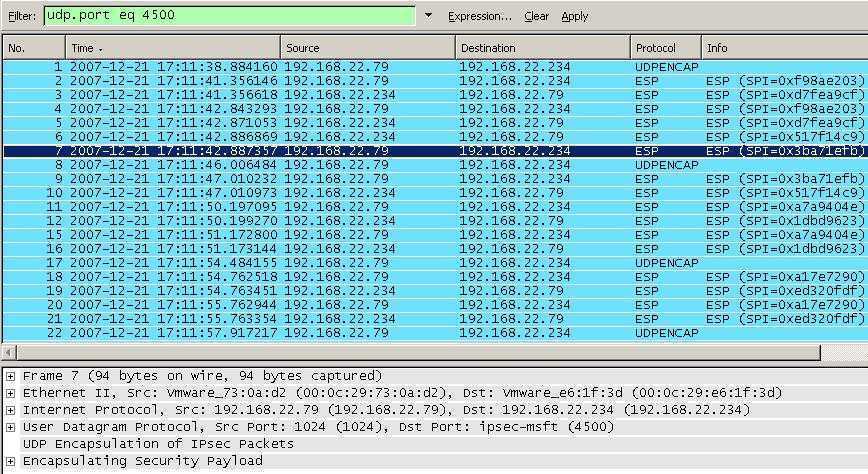
Figure4 shows a Wireshark capture with VPN traffic from the four VPN Clients behind Vyatta(note the different SPIs).
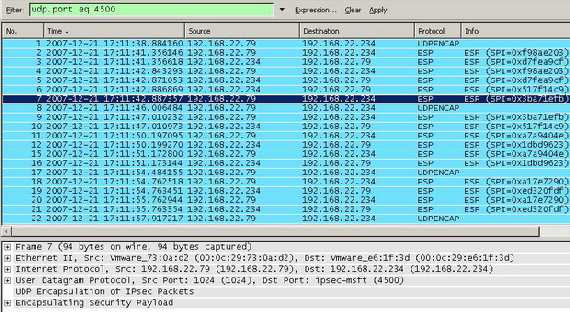
Figure4: Wireshark Capture for L2TP/IPsec VPN Clients
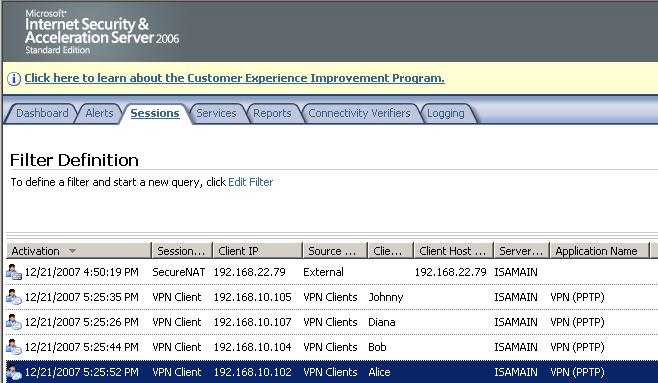
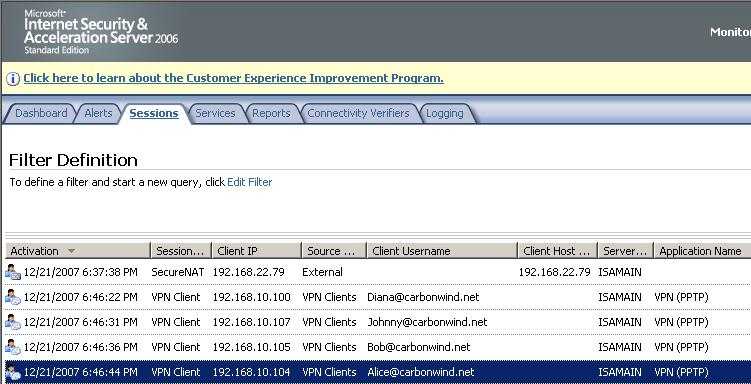
Second test is with four PPTP VPN clients behind Vyatta. Figure5 shows the four VPN clients connected to ISA.
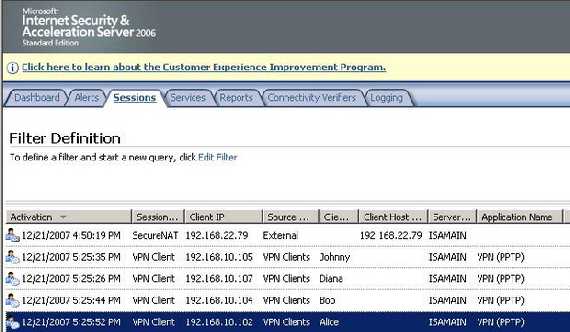
Figure5: ISA Monitoring Sessions PPTP
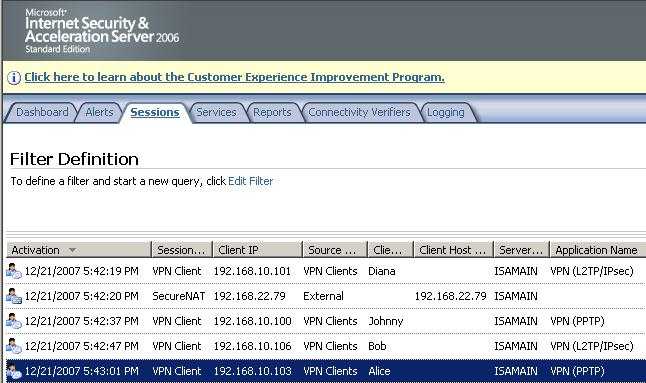
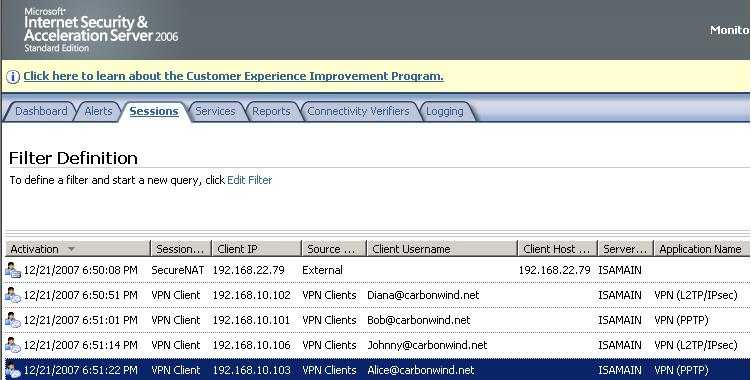
Third test is with two L2TP/IPsec VPN clients and two PPTP VPN clients behind Vyatta. Figure6 shows the four VPN clients connected to ISA.
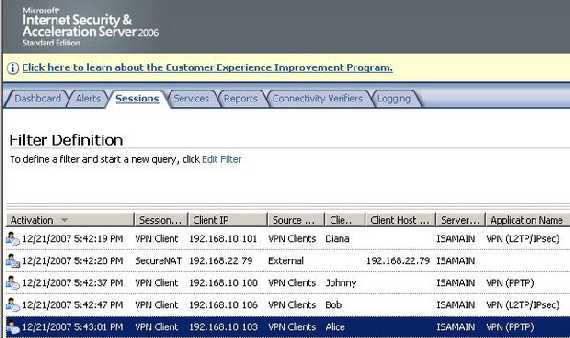
Figure6: ISA Monitoring Sessions Mixed
All the above tests were done using pre-shared keys authentication for IKE(machine authentication) and respectively ms-chapv2 for user authentication(both L2TP/IPsec and PPTP).
We are going to repeat these tests using certificates authentication for IKE(machine authentication) and respectively EAP-TLS for user authentication(both L2TP/IPsec and PPTP).
So here we go again:
First test is with four L2TP/IPsec VPN clients behind Vyatta. Figure7 shows the four VPN clients connected to ISA.
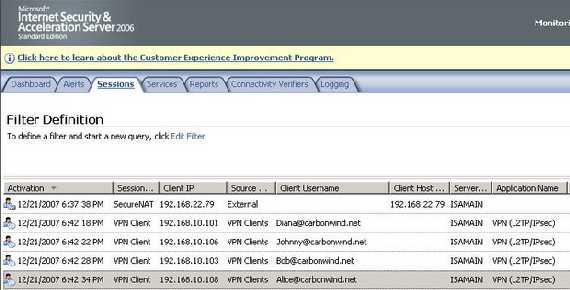
Figure7: ISA Monitoring Sessions L2TP/IPsec Certificates(both machine and user)
Second test is with four PPTP VPN clients behind Vyatta. Figure8 shows the four VPN clients connected to ISA.
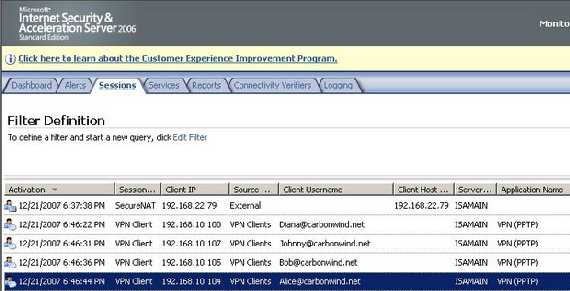
Figure8: ISA Monitoring Sessions PPTP EAP-TLS
Third test is with two L2TP/IPsec VPN clients and two PPTP VPN clients behind Vyatta. Figure9 shows the four VPN clients connected to ISA.
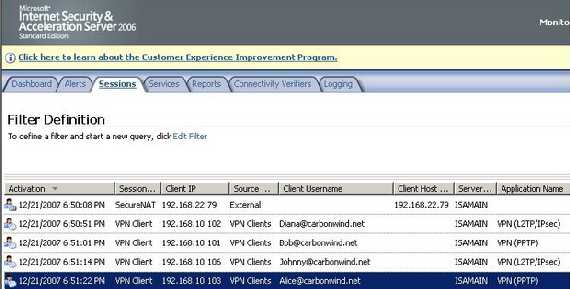
Figure9: ISA Monitoring Sessions Mixed Certificates(both machine and user)
As you can see there was no problem with this scenario either with ISA 2006 or with Vyatta OFR 3.0. Also, as said before you can easily reproduce it in your own lab.
Obviously if we replace Vyatta with an ISA Firewall the outcome would remain the same.
Since it was out of the scope of this article we did not enter in too many technical details.
And here is a little rant for some folks who might think I have forgetten about the bit by bit explanation of L2TP/IPsec in relation with ISA 2006, guess what, I did not, it's going to be called L2TP/IPsec in Pictures because you just love seeing pictures rather than boring long text, don't cha ?
Vyatta configuration can be found here.
|