|
30.01.2008
The Hunt For HTTP Signatures - ISA 2006 Firewall HTTP Filter - Part 3: Other Signatures
- 1. Block the Download of Attachments from Web Mail
- 2. Block the Upload of Files through Web Mail(and not only)
- 3. Talking about Download Managers
1. Block the Download of Attachments from Web Mail
Another thing you may want to block is the download of attachments from Web Mail(like Yahoo Mail, Windows Live Mail or Google Mail).
Before we proceed you must be aware of the fact that if your Web Mail connection is protected from end-to-end with SSL, ISA will not be able to inspect packets. Thus you really need the already mentioned add-on for ISA made by Collective Software called ClearTunnel.
Typically only the credentials are protected with SSL by popular Web Mail services like Yahoo Mail or Windows Live Mail(as writing this article). However Google Mail is able to use SSL after login if you use https://mail.google.com instead of http://mail.google.com. Doing so, after you had login, you will notice that the connection remains protected by SSL.
And obviously if your users use a payed Web Mail solution, they will have the option to protect from end-to-end with SSL their connection.
Let's try to identify a signature for blocking the download of attachments from Web Mail.
We can start the Wireshark capture before we login. But doing so it will result in a big and hard to analyze capture.
Login and navigate to the received email message. Once you have done that, start the Wireshark capture and the live logging on ISA. And now download your attachment.
I will use Yahoo Mail, the new version of Yahoo Mail(not the classic one). I had received a doc.zip attachment.
Time to analyze the Wireshark capture. When I click on the attachment, a virus scan is performed and finally a download link appears. See Figure57.
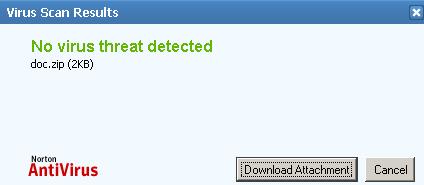
Figure57: Dowload Attachment
This is the critical moment for finding our signature, when we click the "Download Attachment" button.
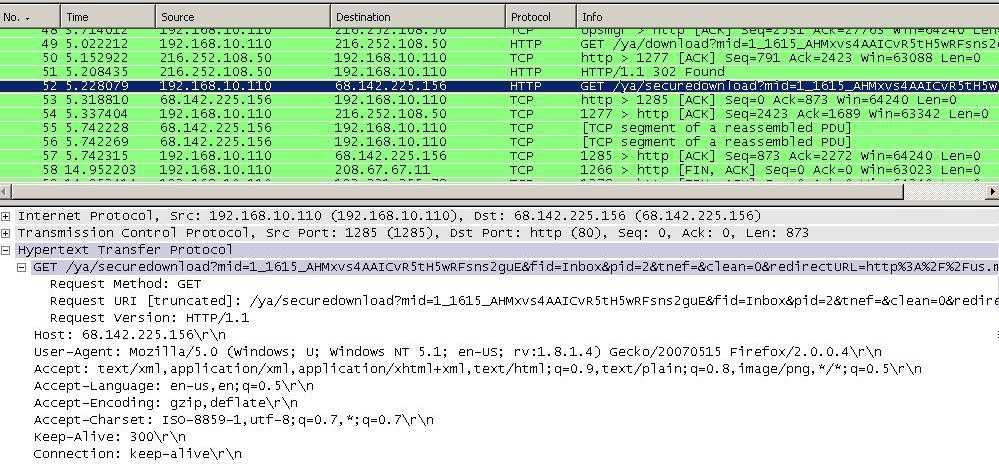
If we look at the Wireshark capture we will notice a couple of "GET" requests. But none of them contains something for useful for us. See Figure58.
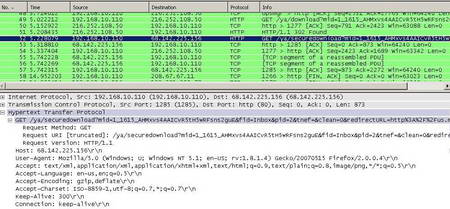
Figure58: Wireshark Capture
Till now we had only searched through HTTP Request Headers. What about the Response Headers ?
There is a segmented server response to the packet selected in Figure58. What we can do is to right-click on that packet and click "Follow TCP Stream". See Figure59.
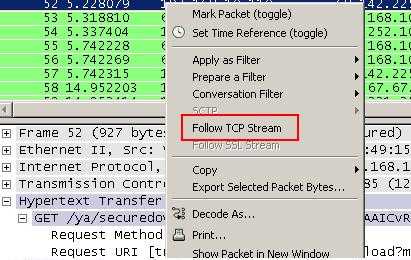
Figure59: Wireshark "Follow TCP Stream"
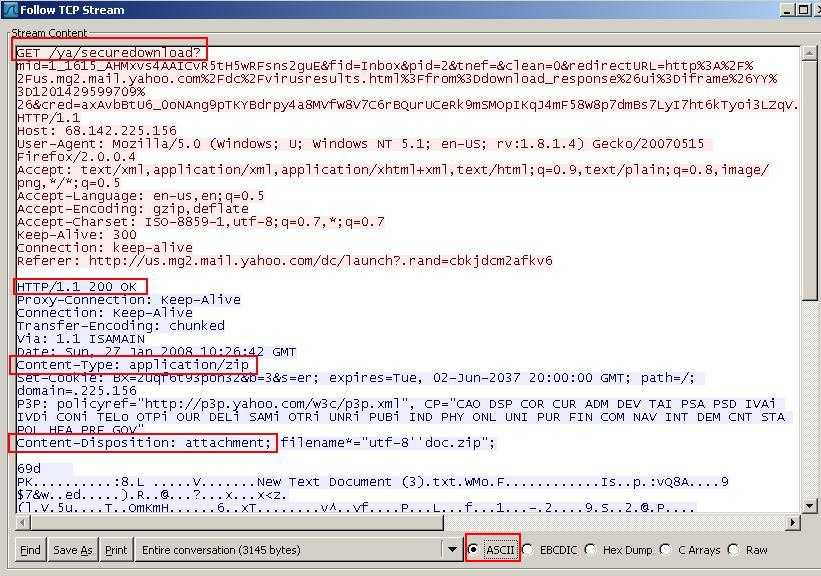
And something very interesting can be observed within the Reponse Header. See Figure60.
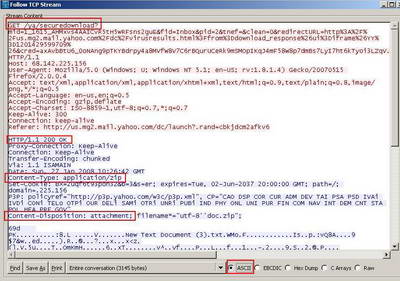
Figure60: Wireshark The TCP Stream
First there is a "Content-Type" field containing "application/zip". This can be useful if we want to block the download of .zip files from Web Mail. But not very efficient, because we can change the extension of it (say .rar).
Also there is a "Content-Disposition" field containing the "attachment" string. Please refer to RFC2183 Communicating Presentation Information in Internet Messages: The Content-Disposition Header Field, an "Internet Official Protocol Standards" (STD 1)for more details about this header field. This might be the signature we are looking for.
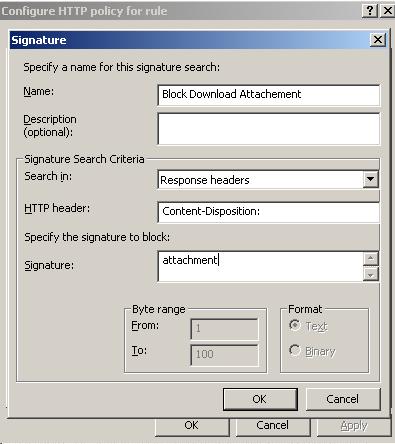
Let's quickly enter this signature on ISA and see what's happening. See Figure61.
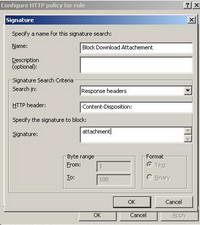
Figure61: ISA "Block The Download of Attachments" Signature
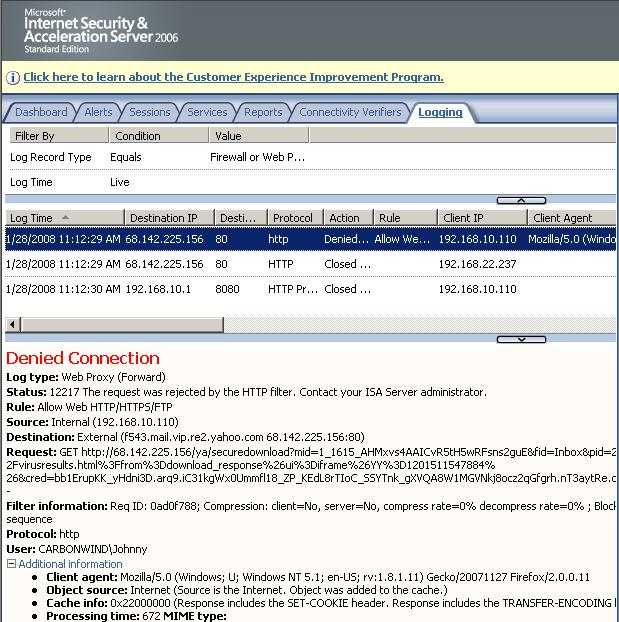
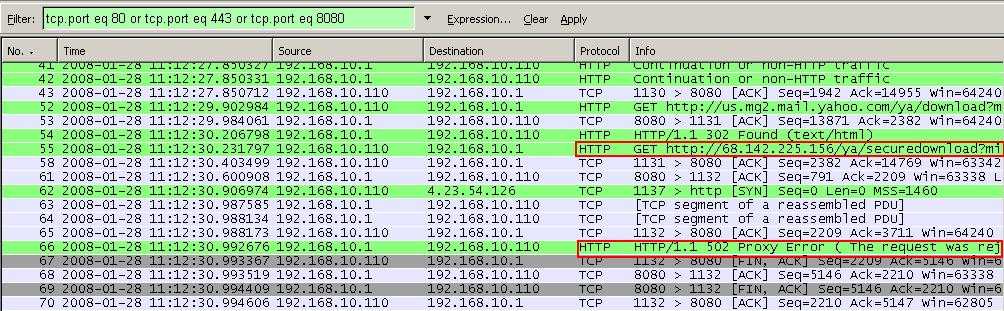
And success. When I click on the "Download Attachment" button(after the virus scan), ISA blocks this time the attempt to download the attachment. See Figure62.
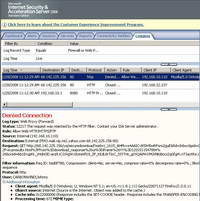
Figure62: ISA Log The Download of Attachment Was Blocked Yahoo Mail
And the correspoding Wireshark capture. See Figure63.
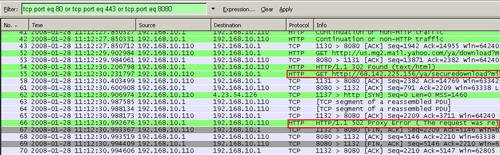
Figure63: Wireshark The Download of Attachment Was Blocked Yahoo Mail
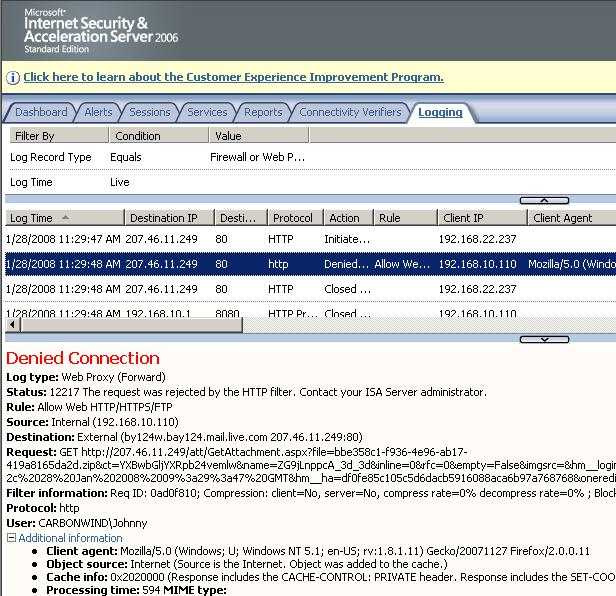
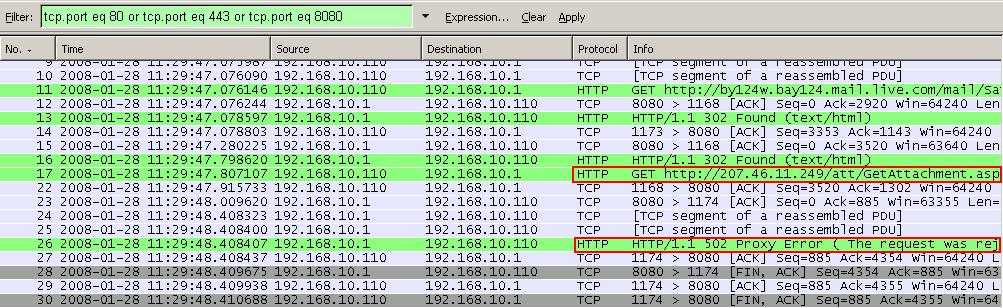
Same thing can be noticed with Windows Live Mail. See Figure64 and Figure65.
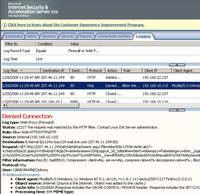
Figure64: ISA Log The Download of Attachment Was Blocked Windows Live Mail
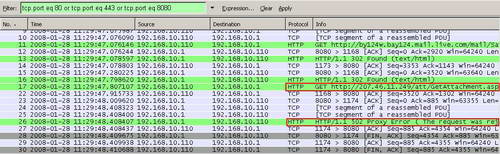
Figure65: Wireshark The Download of Attachment Was Blocked Windows Live Mail
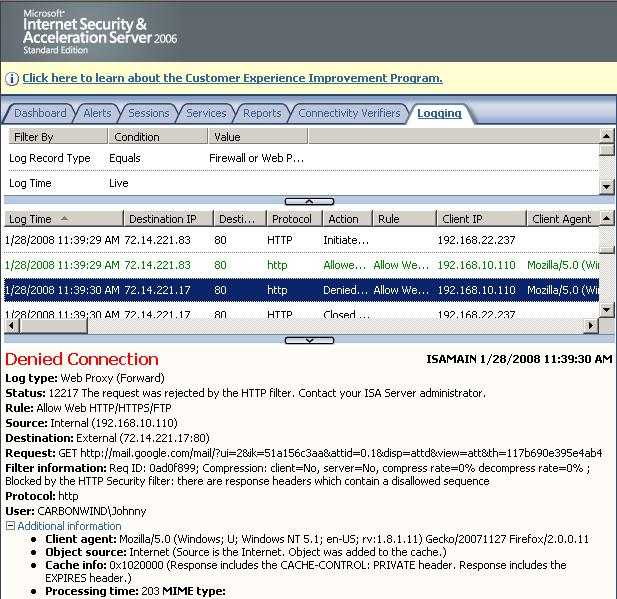
Same thing happens with Google Mail(as long as the session is not protected from end-to-end with SSL). See Figure66 and Figure67.
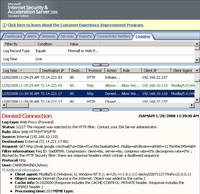
Figure66: ISA Log The Download of Attachment Was Blocked Google Mail
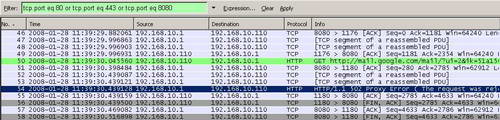
Figure67: Wireshark The Download of Attachment Was Blocked Google Mail
2. Block the Upload of Files through Web Mail(and not only)
You may also want to block the upload of files through Web Mail.
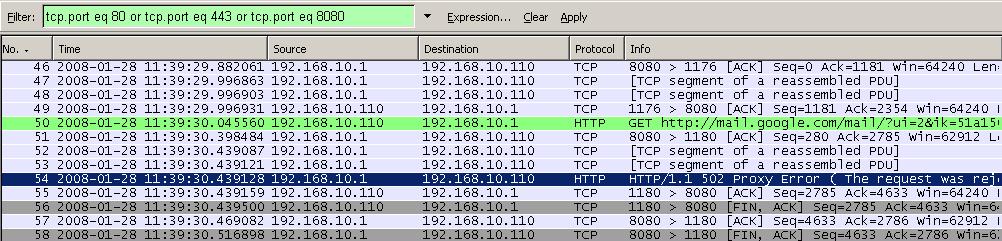
I will use Yahoo Mail for the first test. I will not start the capture from the login phase. I will login, create a new message and start the Wireshark capture before hitting the "Attach" button. Doing this way I will obtain a nice and clean Wireshark capture.
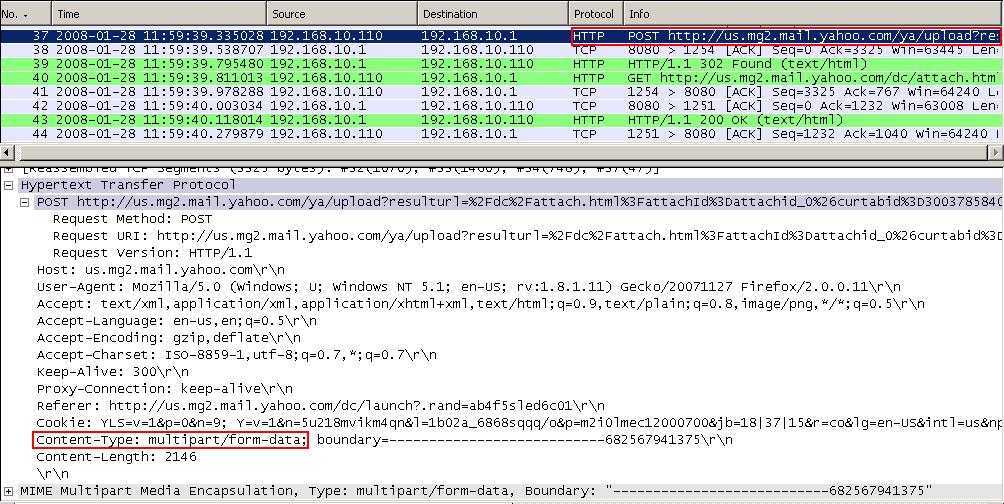
Let's analyze it. See Figure68.
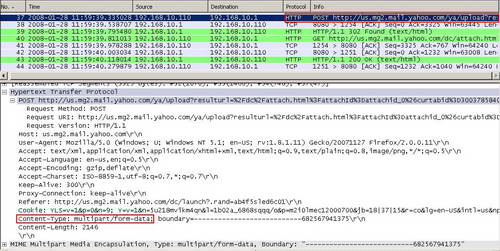
Figure68: Wireshark The Upload of a File Yahoo Mail
We can spot something interesting, within a packet containing the "POST" method. This packet can be easily observed because the Request URL contains the "upload" string. Within the Request Headers there is the "Content-Type" field containing the "multipart/form-data" pattern. We can find out more about this pattern reading the following Microsoft doc: How to Block the Signature for HTML Forms File Upload.
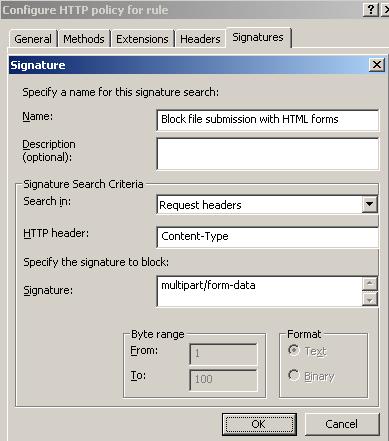
As it is stated there, by blocking this signature with ISA, we will block file submission with HTML forms. Therefore this signature is not useful only to block the upload of files through Web Mail, it will apply to all file submissions with HTML forms. So if you need this feature for a particular destination, you should carefully define your ISA access rules.
Let's configure ISA to block this signature. See Figure69.
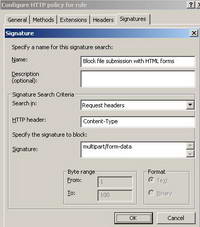
Figure69: ISA Block the Signature for HTML Forms File Upload
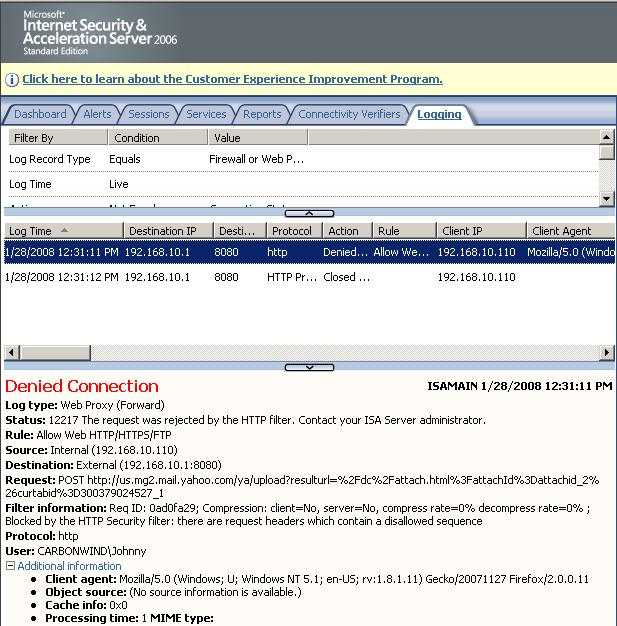
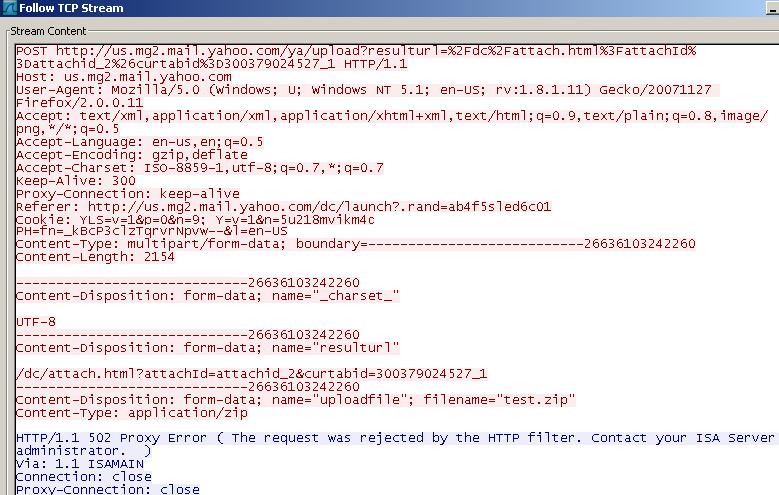
And try again to upload the file. This time ISA blocks it. See Figure70 and Figure71.
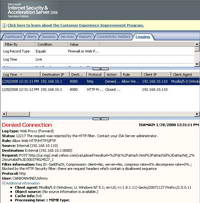
Figure70: ISA Log File Submissions with HTML Forms Blocked Yahoo Mail
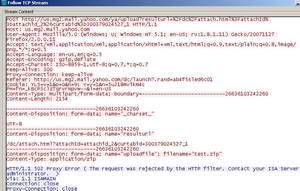
Figure71: Wireshark File Submissions with HTML Forms Blocked Yahoo Mail
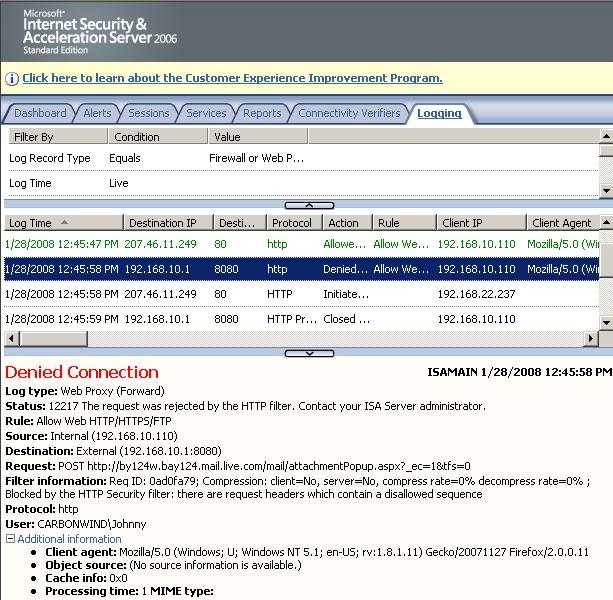
As expected, this signature works for Windows Live Mail too. See Figure72 and Figure73.
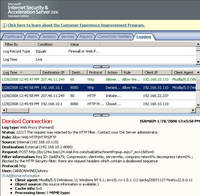
Figure72: ISA Log File Submissions with HTML Forms Blocked Windows Live Mail

Figure73: Wireshark File Submissions with HTML Forms Blocked Windows Live Mail
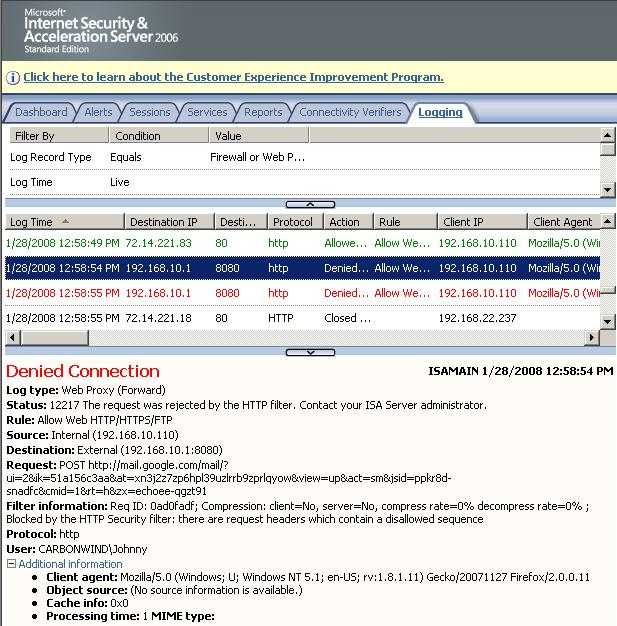
And it will apply to Google Mail as long as the session is not protected from end-to-end with SSL . See Figure74 and Figure75.
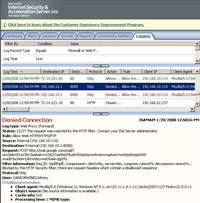
Figure74: ISA Log File Submissions with HTML Forms Blocked Google Mail

Figure75: Wireshark File Submissions with HTML Forms Blocked Google Mail
3. Talking about Download Managers
Before we proceed, note that the download managers were installed on machines that are SecureNAT and Web Proxy clients.
Well, the title has changed now. Instead of blocking, "talking" appear.
Why is that ?
The answer is very simple. Because they are hard to block as we will see later.
ISA is actually capable to kill popular download managers(as we will see later) because they are unable to use NTLM authentication. So unless you check basic authentication on ISA's Proxy, they will never make it through ISA(Integrated Authentication is checked by default, meaning that NTLM or Kerberos are used). Actually some of them or not capable to handle even the basic authentication.
Till now we have analyzed various signatures.
The User-Agent for example. In a perfect world, download managers will have a specific User-Agent. But in reality they don't. They identify themselves with common patterns like Mozilla/4.0, MSIE 6.0, MSIE 7.0, Windows NT 5.1 and so on. Blocking one of these strings will result in the block of many browsers for example.
While download managers are very useful applications because they permit us to take full advantage of our Internet connection speed, users can install them without authorization on the corporate network and therefore exhaust the available bandwidth for the corporate Internet connection.
If you have a capable bandwidth manager installed on ISA(ISA 2006 Firewall does not have bandwidth management features by default, you need a third-party add-on) and ISA is properly configured, although you do not specifically block them(like in case of IM applications), you actually annihilate them. That's due to the fact that users will have a limited and controlled bandwidth. You can identify easily(real time monitoring) wasteful users and limit their traffic usage accordingly. Or you can limit the number of simultaneous connections(as we will see later download mangers can open multiple connections to the same URL and might have p2p capabilities).
Let's analyze one such client. Probably one of the best download manager is Mass Downloader(shareware).
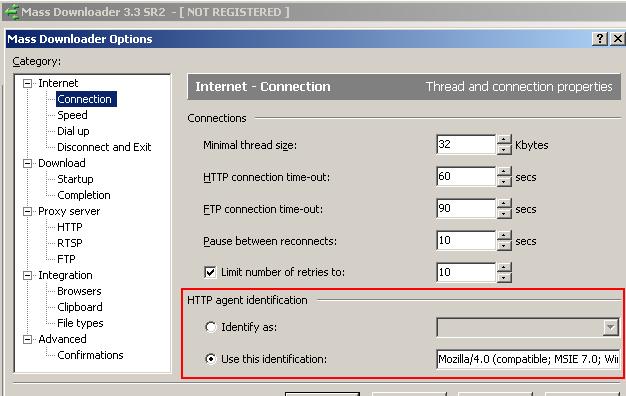
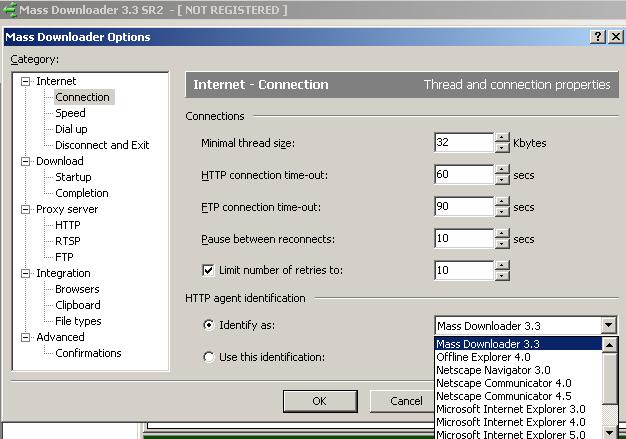
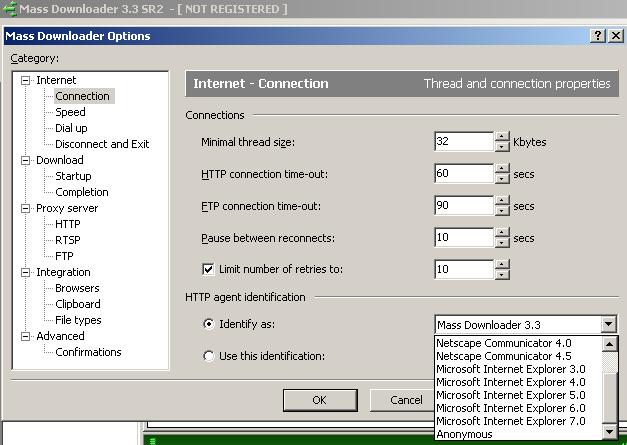
Let's take a look at it. Actually, we can set its User-Agent. See Figure76, Figure77 andFigure78.
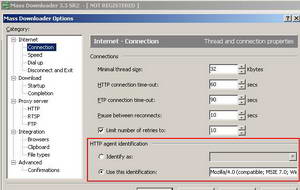
Figure76: Mass Downloader Options: Default User-Agent
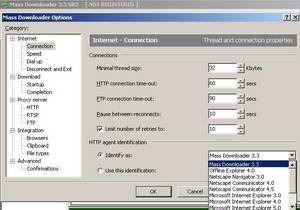
Figure77: Mass Downloader Options: More User-Agents
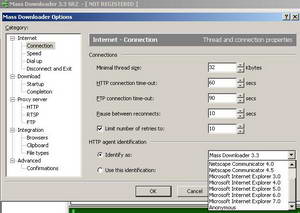
Figure78: Mass Downloader Options: More User-Agents
As can be seen from the above pictures we won't have any luck in blocking Mass Downloader by its User-Agent, unless the users are dumb enough to use the "Mass Downloader 3.3" User-Agent. You can change the number of retries, increase/decrease the connection time-out for HTTP and FTP.
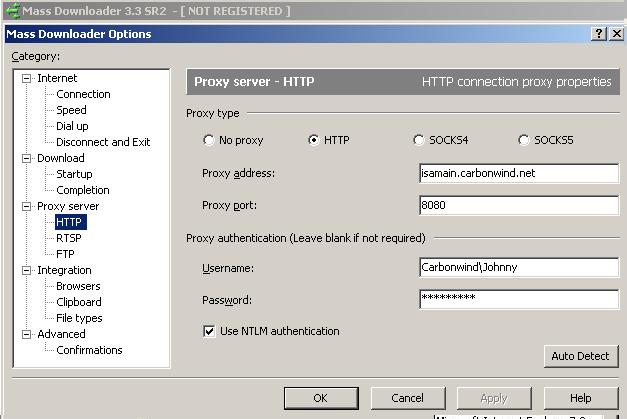
Also it can use a Proxy Server that requires authentication(including NTLM). So it does not have any problems with the authentication required by ISA. See Figure79.
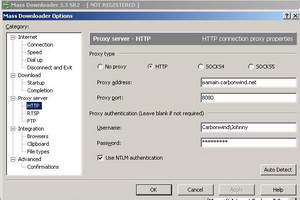
Figure79: Mass Downloader Proxy Server Settings
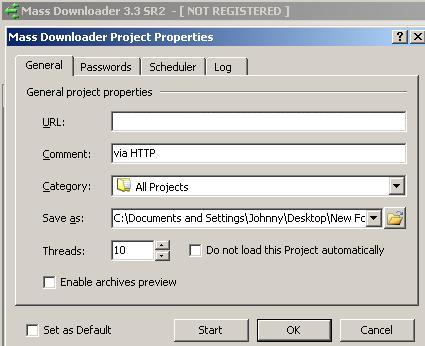
When you start a new Project you can set the number of threads(downloading channels). The default value is 10. This value specifies in how many parts the file will be split when it's downloaded. All the parts will be loaded simultaneously to increase speed. Actually 10 simultaneous connections will be used. See Figure80.
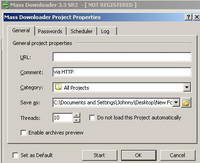
Figure80: Mass Downloader Project Properties
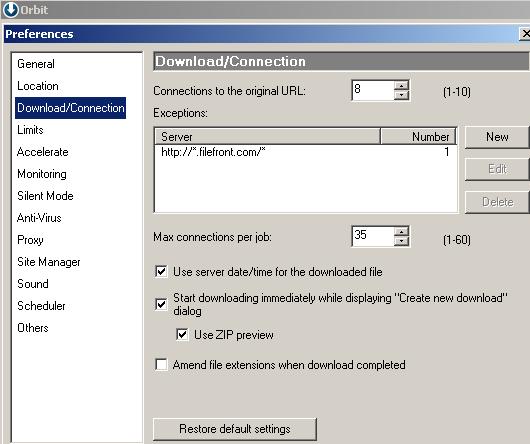
Other popular download managers support multiple connections to the same URL too(in order to increase the download speed). Orbit Downloader for example. See Figure81.
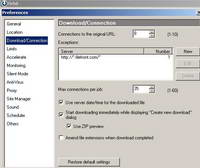
Figure81: Orbit Downloader
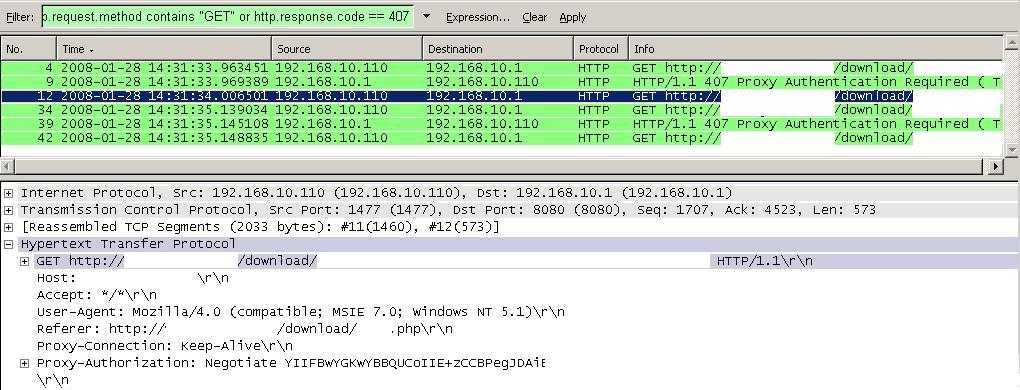
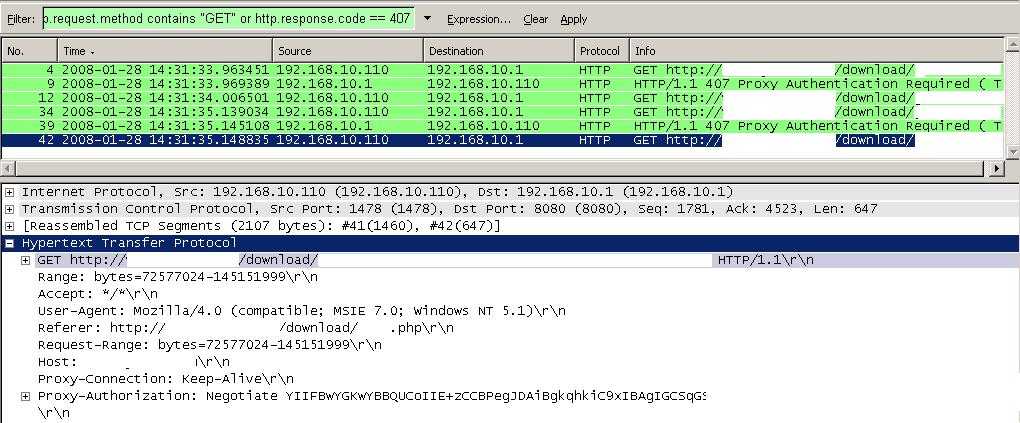
I've made a quick test to visualise this behaviour. Limit the number of threads to two. The Wireshark capture shows two "GET" requests made when the file is downloaded. SeeFigure82 and Figure83.
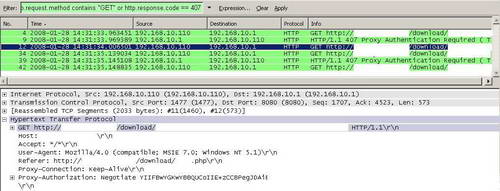
Figure82: Two Simultaneous Connections: First from Source Port 1477
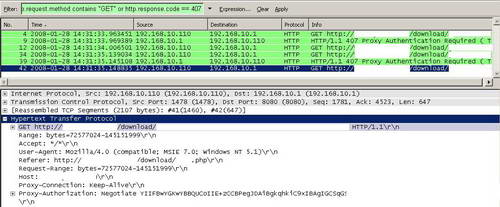
Figure83: Two Simultaneous Connections: Second from Source Port 1478
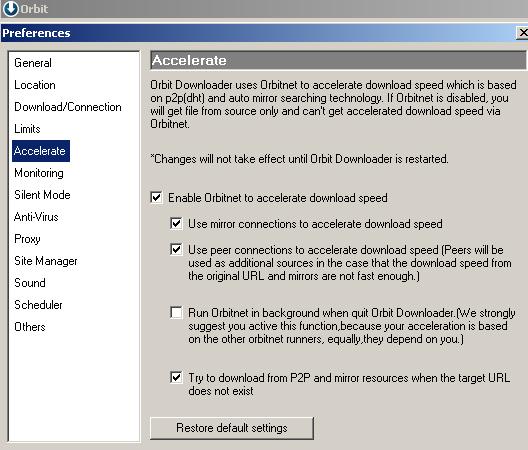
Orbit Downloader has an option to accelerate downloads by the use of Orbinet(p2p(dht) and auto mirror search). See Figure84.
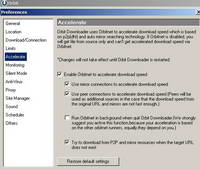
Figure84: Orbit Accelerate
Note that, as writing, Orbit Downloader cannot authenticate against a Proxy Server. Thus if you require authentication on your web access rules(as you should), Orbit Downloader cannot pass through ISA.
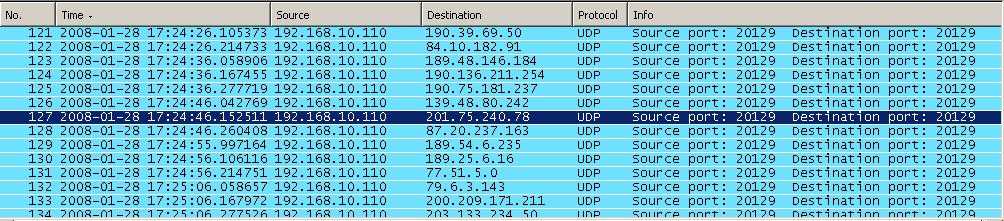
Also if you start a Wireshark capture on the client on which Orbit Downloader is idle running, you will see a lot of UDP packets send to numerous destination hosts due to Orbinet and p2p. See Figure85.
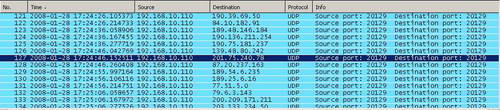
Figure85: Orbinet Traffic
Unless you use an "Allow All" rule from "Your Client Network" to "External", these packets will be blocked by ISA. Remember: "Allow All" rules can make your firewall useless!
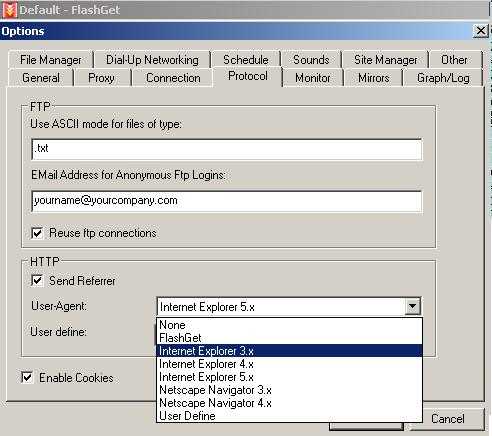
FlashGet is another popular download manager. Like Mass Downloader, it lets us specify its User-Agent. See Figure86.
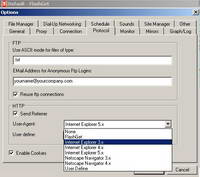
Figure86: FlashGet User-Agent
Although it supports an authentication proxy, as writing this article it does not handle NTLM authentication, only basic authentication.
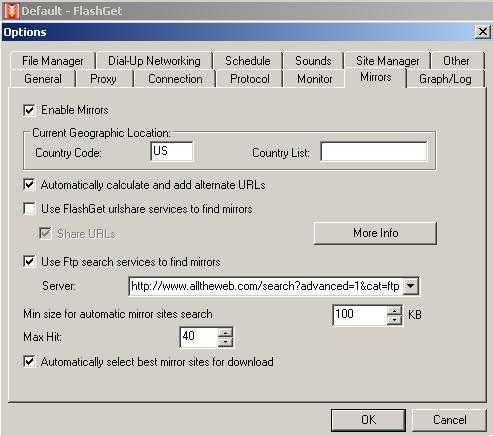
It also supports the use of mirrors. See Figure87.
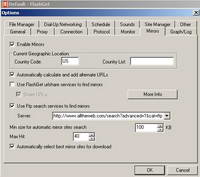
Figure87: FlashGet Mirrors
If you require authentication on your web access rules(as you should), FlashGet cannot make it through ISA(referring to the version currently available as writing this article) unless you have enabled Basic authentication(by default only Integrated authentication is enabled) on ISA's Web Proxy.
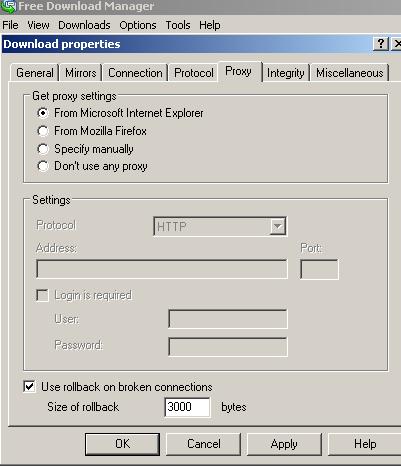
Another popular application is Free Download Manager. This one supports an authentication proxy and actually it can use Kerberos. See Figure88.
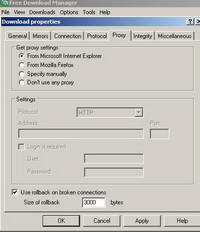
Figure88: Free Download Manager Proxy Server Options
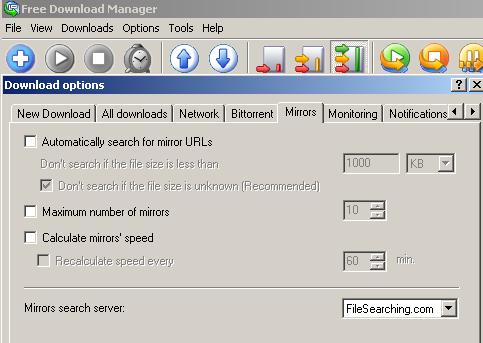
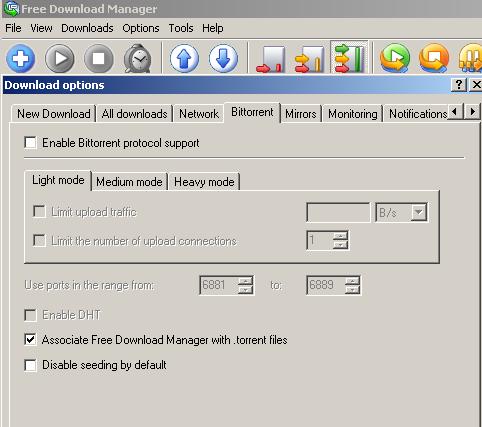
It also provides support for mirrors and BitTorrent. See Figure89 and See Figure90.
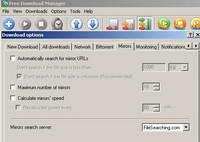
Figure89: Free Download Manager Mirrors
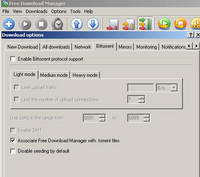
Figure90: Free Download Manager Bit Torrent Support
It also supports multiple connections to the same original URL.
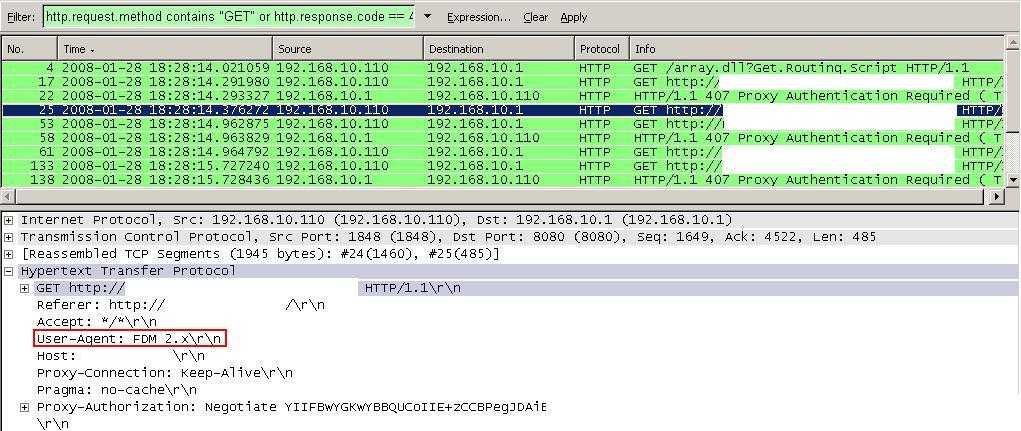
However, as default installed, it has a specific User-Agent(version 2.5 is the latest as currently writing). See Figure91.
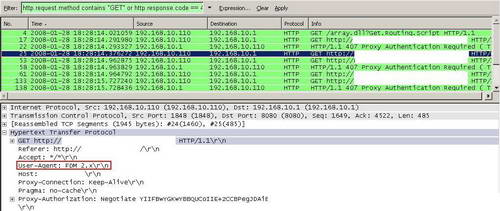
Figure91: Wireshark Free Download Manager Capture
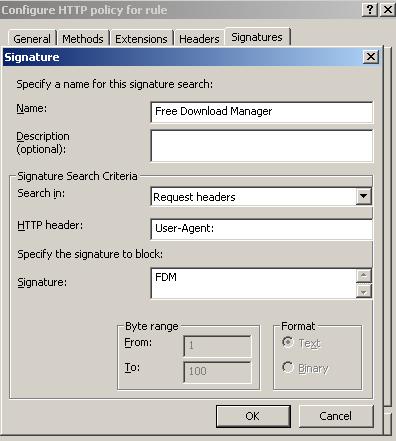
Thus we can configure ISA to block this signature. See Figure92.
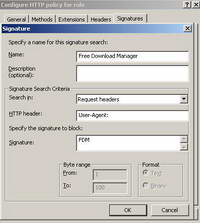
Figure92: ISA Free Download Manager Signature
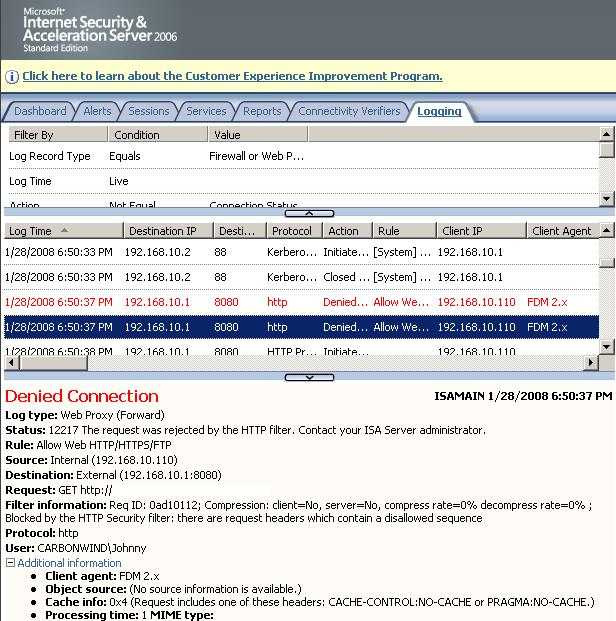
And as expected, ISA blocks it. See Figure93.
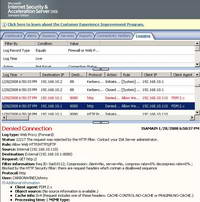
Figure93: ISA Log Free Download Manager Blocked
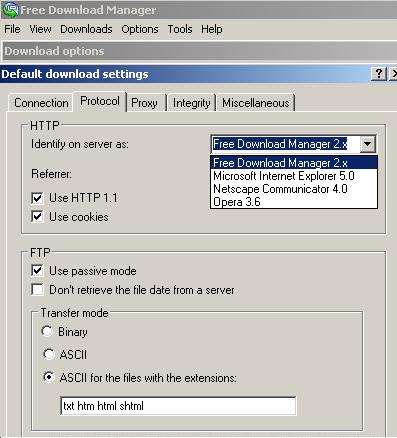
However if your users are smart, this detail can be "fixed", they can specify another User-Agent and Free Download Manager will escape though ISA. See Figure94.
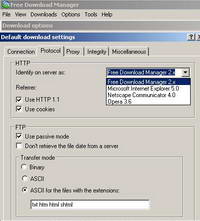
Figure94: Specify the User-Agent for Free Download Manager
As said before, with the correct bandwidth manager installed on ISA, we can easily annihilate these download managers. Also you should always allow only needed traffic to needed destinations.
One such bandwidth manager for ISA 2006 Firewall might be Bandwidth Splitter.
We will disscus it in A Bandwidth Manager for ISA 2006 Firewall : Bandwidth Splitter and see how it can deal with the problems posed by download managers on the corporate network.
|